
Man skulle tro det var enkelt at skifte domæne for en WordPress blog, men det er det ikke altid helt uden problemer. I denne artikel kan du læse om mine erfaringer med at skifte domæne for en WordPress blog og hvad jeg gjorde for at sikre at SEO værdien fra det gamle domæne overføres til det nye. Læs videre “Flyt WordPress blog til et nyt domæne”
De bedste 25 must-have WordPress plugins

Hvis du laver websider i WordPress har du sikkert allerede fundet dine favorit plugins. Det har jeg selvfølgelig også og i denne artikel vil jeg dele alle de plugins der går igen på stort set alle mine WordPress sider – selvfølgelig afhængig af om det er relevant på det pågældende site. Har du nogle WordPress plugins der er rigtig gode, må du meget gerne dele dem med os i kommentarerne. Læs videre “De bedste 25 must-have WordPress plugins”
5 tips to prevent spam in WordPress
WordPress is the most used CMS in the world, but has unfortunately one disadvantage. It has a huge spam problem. If you just install a wordpress system and open for all to comment you will get a lot of spam comments.
And what is the problem with spam content? Your visitors don’t like it and search engines wont like it. It is bad for SEO – partly because most of it is duplicate content and partly because search engines are becomming better detecting spam.
So it is really important for all website owners to prioritize spam fight on your website.
But how do you best fight spam on WordPress?
Akismet
Akismet is the best WordPress plugin for detecting spam. And it is actually already build into WordPress. All you need is a free serial code. A must have on all WordPress sites.
Cookies for comments
This plugin is really great for detecting spam behavior. Using a cookie you can for instance say that all persons that writes a comment should at least use 6 seconds doing this. Not many spammers use that much time – it is simply copypaste.
Approve all comments
Always approve all comments. This ensures that comments are real, although it doesvrequire some work.
Captcha fields
Captcha fields are fields where users are asked to enter a word from an image – something a robot cannot do.
Only do this if spam is really a huge problem, because it damage user experience.
Install on all forms, e.g. comments, contact, registration etc.
Nofollow links
If you allow links in your comments remember to set them as nofollow links. Some spammers only want dofollow links because they have higher values.
This was my spam tips for today. How do you fight spam and which plugins do you use. Feel free to write a comment.
Should I still use Google Authorship?
Last year Google gave us Google Authorship – but now they take away profile pictures in SERP. How does this affect my site and should I still use Google Authorship in the future? Here is an analysis of the change and how this can affect SEO for websites.
Why was Google Authorship introduced?
First we have to remember why Google Authorship was introduced back then.
One of the reasons was to give more users to Google+ – Googles own social platform. That did work – really many people has a profile on Google+ although not all are active users. But even though a user is not an active user, most of them will then have a Google profile and will be logged into Google while they use Googles products. This gives Google a lot of great informations about all users.
Second Google want to prevent so much spam from being showed in SERP. It is not so easy to creat spam content using Google Authorship, so in this way Authorship will be a way that Google can recognize sites that are probably not spam.
Third Google wants people to take ownership of there content, which is also possible with Authorship. This makes it easier for Google to recognize original content.
Fourth Google wants to recognize the best content for the visitors, i.e. content written by authors with highest authority. When people use authorship, Google can calculate an authorrank for search keyword for each author and in this way show the best content.
All these four reasons are still relevant and will always be relevant because it gives the visitors the best content – and this is Googles primary goal.
Why was the profile photo introduced in SERP?
The profile photo has really been one of the most popular thing about authorship. Especially because many people think that when the profile photo is showed in SERP, then people will easier recognize the site because the photo is more eye catchy. And I am sure that this profile picture itself affect CTR.
But Google is not directly interested in this. Why should it be because the site use Google Authorship that the visitor should visit this site? No instead Google will show the most relevant pages for the users in the top of the SERP – and this includes information from author rank.
So since the profile photo might get more focus on the sites with photo instead of the first site on SERP – this gives the visitor a site that Google did not necessary think was number 1. This is a primary reason why profile photo is not relevant for the end user. And if something is not relevant for the end user – only for the website owner – Google remove it.
Another reason can also be that the profile photo was more recognized by the end user, than ads in SERP.
Author rank still exist
But remember that Author rank probably still exist. Author rank is the factor that is calculated from a authors authority towards a certain topic. Google get this information from how much of the same content you create, how many social users that share and comment your comments, how many +1 your site gets etc. And this author rank still exists, even though Google has removed profile photos from SERP.
So it is important to still keep working with getting a high author rank towards a certain topic, if you want to rank high in Google. Because Google still uses authorship – it is just not so visible for the end user.
Will it affect my rank in Google?
No, the rank in Google will probably be the same. If you before were number 1 in Google towards a certain search keyword, you will still be. The reason for this is that the ranking is not affected and author rank still exist.
Will it affect my CTR?
Perhaps. Now where a profile picture is not showed any more in SERP, the site will maybe not be recognized as easy in SERP and this will lead to a lower CTR.
Some people has written about cases where their CTR was increased with up to 150% because of Google Authorship – and some of this might be decreased again. But just remember that this increase in CTR could not just be because of the profile photo – author rank would also increase your CTR because you get a higher rank.
Should I still use Google Authorship on my websites?
Certainly. Google Authorship and author rank still exist as it has always done – but it is just not so visible to the end user. Perhaps you can expect to lose some visitors because of a lower CTR, but the rank in Google will probably not be affected.
How can I track my Authorship CTR?
You can always see how many time Google Authorship has been showed in SERP and what the CTR is in these cases. This is showed in Google Webmastertools under Labs -> Author stats.
It would be interesting to see in the future if people saw a decrease in this Authorship CTR and how big this decrease is.
Authorship profilfoto forsvinder fra søgeresultater

Nu var Authourship lige blevet så populært, fordi man så fik en mulighed for at få vist sit Google+ profilfoto i søgeresultaterne Læs videre “Authorship profilfoto forsvinder fra søgeresultater”
SDU installerer nu spyware på studerendes computer

SDU har igennem nogle år haft digitale eksamener, hvor de studerende skal medbringe deres egen computer med forudinstallerede programmer afhængig af hvilken eksamen de skal til. Men eksamenssnyd har været et stort problem. Derfor skal de studerende i fremtiden nu installere et overvågningsprogram, kaldet Exam Monitor, så SDU kan overvåge hvad der foregår på de studerendes computer. Læs videre “SDU installerer nu spyware på studerendes computer”
Så kan NemID endelig bruges på mobilen

I lang tid har NemID kun kunne bruges fra en PC – ikke fra mobiltelefonen. Forklaringen er at mobiltelefoners apps er udviklet i Java og det er NemID også. Derfor kan man ikke åbne en Java-app inde fra en Java-app.
I flere år har banker og andre tjenester udviklet alternative loginmetoder, hvor man skulle logge på med mobilkoder og kunne undgå at skulle bruge NemID.
Men endelig ser det ud til at der snart er udviklet en afløser for den javabaserede NemID – nemlig en javascript-baseret NemID. Dels vil det gøre at man kan bruge NemID på mobilen og dels vil det gøre at man ikke behøver at have Java installeret og opdateret for at kunne bruge NemID.
Det sidste er en god ting, da vi har set eksempler på at brugere opdaterede deres Javaversion og efterfølgende ikke kunne bruge NemID. Dette bliver slut nu, hvor det blot kræver at browseren understætter Javascripts.
Det har også været en dyr løsning der kostede hele 47 millioner kroner. Halvdelen er betalt af bankerne og halvdelen af det offentlige.
Viaplay kan bruges til chromecast
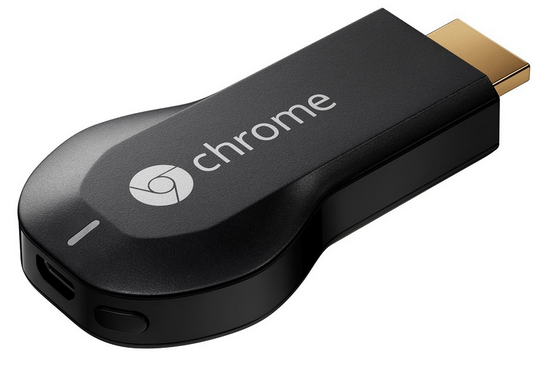
Viaplay melder sig nu også på banen over streamingstjenester der kommer til at fungere med chromecast. Indtil videre har det kun været netflix af de store udbydere der har været understøttet af chromecast, men nu følger Viaplay trop og indfører en chromecast knap i deres app.
Dette vil gøre det muligt at kunne se sine viaplay film på tv’et uden at skulle slutte sin computer til at se dem på en tablet. Man finder bare filmen på sin mobil og trykker på en knap og så ses den direkte på tv’et.
Nu mangler vi bare nogle af de sidste streamingtjenester kommer med. Det kunne være rart hvis følgende tjenester også blev understøttet af chromecast:
- TV2 Play
- DR NU
- Youbio
- Nutv
Hidtil har disse dog meldt ud at de ikke har planer om at understøtte chromecast endnu.
Redirect old wordpress site to new wordpress domain
In this article I will short show you how to redirect an old domain to a new domain using HTACCESS. First you have to either create a .HTACCESS file and put it in the root of your domain. Alternative you can install the plugin WordPress SEO and choose Edit files and then edit the HTACCESS file directly from there.
Then you insert the following code:
# BEGIN WordPress
<IfModule mod_rewrite.c>
RewriteEngine On
RewriteBase /
RewriteRule ^index.php$ – [L]
RewriteCond %{REQUEST_FILENAME} !-f
RewriteCond %{REQUEST_FILENAME} !-d
RewriteRule . /index.php [L]
RewriteCond %{HTTP_HOST} ^olddomain.com$ [OR]
RewriteCond %{HTTP_HOST} ^newdomain.com$
RewriteRule (.*)$ http://www.newdomain.com/$1 [R=301,L]
</IfModule>
# END WordPress
In this code you will both redirect a whole old domain olddomain.com to a new domain newdomain.com – and redirect the not-WWW version of your new domain til the WWW-version of your new domain.
Events made easy – remove the seats field
Events made easy is a plugin for WordPress that enables you to build a booking system, which can be used for booking sessions or events with customers. There is some fields on the registration form that is required, e.g. name, e-mail, phone etc.
Another field that is required is a field where the customer can choose the amount of seats for the booking that they want for the event. If the customer can only choose one seat, because this is the only option in the type of event they are booking, it does not make sense to show the field, because the value is always one.
Unfortunately there is no build-in option to hide the field. When you try to remove it from the template, your registration form will not be showed, because a required field is missing. In this article I will show a work-around you easy can use to hide the field seats in events made easy.
Edit the file events-made-easy/eme_formfields.php
First we have to change in the settings of events made easy, so it does not hide the registration form when we remove the field from the template. Here is how you do:
- Open Plugins -> Editor -> Choose the field: events-made-easy/eme_formfields.php
- Find the line $required_fields_count = 0; and change this to:$required_fields_count = 1;
- Find the line $bookedSeats=0; and change this to:$bookedSeats=1;
- Save the file.
Edit the template
Then you have to change the template so the field is not there anymore.
- Open Events -> Settings -> RSVP
- Go to the bottom and remove the following line in the template:
<tr><th style=’background-color:white;color:#000000;border:0px;’>Seats:</th><td>#_SEATS</td></tr>
- Then add the following line:
<input type=”hidden” id=”bookedSeats” name=”bookedSeats” value=”1″>
- Save the template
This should do the trick. The last line you have added is a hidden field where the value is the standard value for the amount of seats. We cannot avoid this hidden field, because events made easy has to know how many seats that are taken. But this field will not be showed for the customers.